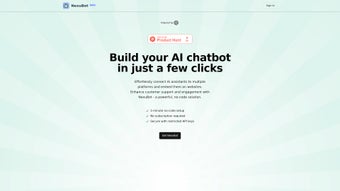

Download NexuBot – no‑code chatbot integration, multi‑channel AI assistant tool
Overview – Why NexuBot Is the Smart Choice for Modern Businesses
In today’s hyper‑connected market, customers expect instant, personalized responses across every communication channel they use – from web chat and Facebook Messenger to WhatsApp and SMS. NexuBot answers that demand by offering a powerful web‑based platform that streamlines the integration of AI assistants into any chatbot environment. Built with a clear focus on accessibility, NexuBot eliminates the need for deep programming knowledge. Its no‑code setup lets marketers, support teams, and small‑business owners launch sophisticated AI‑driven conversations without hiring a developer. The platform consolidates multi‑channel management into a single, intuitive dashboard, so you can monitor performance, tweak dialogue flows, and scale operations from one place.
Cost is another differentiator. While many chatbot solutions lock you into recurring subscription fees, NexuBot operates on a one‑time payment model, providing a predictable, upfront investment that removes the anxiety of monthly bills. Security is baked in: API keys are stored in a restricted, encrypted environment, ensuring that only authorized services can communicate with your AI assistants. Unlimited chatbot creation further empowers businesses to experiment with different personas, languages, or campaign‑specific bots without additional charges. By centralizing integration, reducing development overhead, and offering a secure, cost‑effective licensing structure, NexuBot maximizes return on investment while delivering a seamless customer experience.
Whether you are looking to boost lead generation, enhance self‑service support, or simply keep pace with the expectations of a digitally native audience, NexuBot provides the tools needed to connect AI assistants with existing communication channels efficiently and safely. The following sections dive deeper into its core capabilities, installation process, system compatibility, and the balanced pros‑and‑cons view reported by real users.
Key Features – What Sets NexuBot Apart
- Multi‑Channel Integration: Connect AI assistants to web chat, Facebook Messenger, WhatsApp, Slack, SMS, and more from a single control panel.
- No‑Code Workflow Designer: Drag‑and‑drop interface lets non‑technical users build conversation trees, set triggers, and map intents without writing code.
- Unlimited Bot Creation: Launch as many distinct chatbots as needed for different departments, languages, or marketing campaigns.
- Secure API Management: Encrypted storage of API keys and granular permission controls protect your integrations from unauthorized access.
- One‑Time Payment Licensing: Pay once, own forever – no hidden monthly fees or usage‑based charges.
- Real‑Time Analytics Dashboard: Monitor user engagement, conversion rates, and bot performance across all channels with built‑in reporting tools.
- Scalable Architecture: Cloud‑hosted infrastructure automatically handles spikes in traffic, ensuring consistent response times even during high‑volume campaigns.
- Seamless Third‑Party Integration: Native connectors for popular AI platforms such as OpenAI, Google Dialogflow, and IBM Watson.
- Self‑Service Knowledge Base: Built‑in FAQs and suggested replies accelerate support team onboarding and reduce handling time.
- Regular Updates & Bug Fixes: Free lifetime updates keep the platform current with the latest security patches and feature enhancements.
These features are not isolated check‑boxes; they work together to create a cohesive ecosystem where every department—sales, support, marketing—can benefit from a unified AI‑driven communication strategy. The visual workflow builder eliminates the steep learning curve that typically accompanies chatbot development, while the analytics suite offers the data insights necessary to fine‑tune interactions and improve conversion metrics over time. Security‑first design reassures IT leaders that sensitive data remains protected, and the unlimited bot policy encourages experimentation without worrying about incremental costs. In short, NexuBot’s feature set is deliberately built to empower businesses of all sizes to adopt AI assistants quickly, safely, and affordably.
Installation, Usage & Compatibility – Getting Started in Minutes
Step‑by‑Step Installation
1. Visit the official NexuBot website and click the “Download” button. Because NexuBot is a cloud‑based web application, the download simply provides you with a
secure account creation link rather than a bulky installer.
2.
Create your account using an email address or single‑sign‑on (SSO) via Google
or Microsoft. A verification email confirms your identity and activates your license
instantly—no waiting for manual approval.
3. Log in to the dashboard.
The first‑time login wizard guides you through
essential configuration steps: selecting your primary AI provider (OpenAI, Dialogflow, etc.),
generating an API key, and setting up your first communication channel.
4. Connect a channel by choosing from the list of supported platforms. Each channel includes a short OAuth flow that authorizes NexuBot to send and receive messages
on your behalf.
No code is required; simply follow the on‑screen prompts.
5. Design your bot using the visual workflow editor. Drag intents, set
conditions, and attach response templates.
When you’re satisfied, click “Publish” to make the bot live across the selected channels.
Daily Usage Tips
Once your bots are live, the dashboard becomes your command center. Use the real‑time analytics tab to track active conversations, average response times, and conversion rates. The built‑in “Test Bot” sandbox lets you simulate user queries without affecting live traffic, which is ideal for iterative improvements. For teams, the role‑based access control lets managers assign “Editor”, “Viewer”, or “Administrator” rights, ensuring that only authorized personnel can modify critical bot logic. Regularly review the “Insights” panel to spot trends—such as frequently asked questions or drop‑off points—and adjust your scripts accordingly.
System Compatibility
NexuBot runs entirely in the browser, making it compatible with any modern operating system that supports HTML5 and JavaScript. Whether you use Windows 10/11, macOS Ventura or later, popular Linux distributions (Ubuntu, Fedora, etc.), or mobile platforms like Android 9+ and iOS 13+, you can access the full feature set from Chrome, Edge, Firefox, or Safari. Because the platform is cloud‑hosted, there is no need for local installation, and performance is largely dependent on your internet connection rather than hardware specifications. The responsive design adapts seamlessly to tablets and smartphones, allowing support agents to manage bots on the go.
In summary, getting started with NexuBot is deliberately frictionless. The combination of a web‑based delivery model, intuitive onboarding wizard, and cross‑platform compatibility ensures that businesses can deploy AI assistants quickly and maintain them without a dedicated IT department. Whether you’re a startup looking to automate lead capture or an enterprise seeking to centralize omnichannel support, the installation and usage workflow is designed to save time, reduce complexity, and keep you focused on delivering value to customers.
Conclusion – Is NexuBot Right for Your Business?
Pros and Cons – Balanced View
Pros
- No‑Code Friendly: Users without programming skills can build sophisticated bots.
- One‑Time Payment: Eliminates recurring subscription costs, offering clear ROI.
- Multi‑Channel Support: Manage web chat, social media messengers, SMS, and more from one dashboard.
- Unlimited Bot Creation: Scale your AI presence without additional licensing fees.
- Secure API Management: Encrypted storage and granular permissions protect data integrity.
- Real‑Time Analytics: Insightful metrics help continuously improve bot performance.
- Cross‑Platform Compatibility: Works on Windows, macOS, Linux, Android, and iOS browsers.
- Regular Free Updates: Lifetime updates keep the software current and secure.
Cons
- Cloud‑Only Model: Requires an internet connection; no offline mode is available.
- Limited Deep Customization: Advanced developers may miss low‑level code hooks.
- Pricing Upfront: The one‑time fee can be a barrier for very small businesses with tight cash flow.
- Dependency on Third‑Party AI Providers: Bot quality relies on the chosen AI service’s capabilities.
- Learning Curve for Complex Flows: While no‑code, intricate conversation trees can become unwieldy without proper planning.
Frequently Asked Questions
Can I try NexuBot before purchasing?
Yes. NexuBot offers a 14‑day free trial that includes full access to all features, allowing you to test multi‑channel integration, the visual workflow builder, and analytics without entering payment details.
Which AI platforms are supported out of the box?
NexuBot integrates natively with OpenAI (ChatGPT, GPT‑4), Google Dialogflow, and IBM Watson. Additional providers can be added via custom API connectors.
Is there a limit to the number of simultaneous users?
Because the service is cloud‑hosted and scales automatically, there is no hard limit on concurrent users. Performance depends primarily on your internet bandwidth and the capacity of the underlying AI service.
How does NexuBot ensure data privacy?
All API keys and session data are stored in AES‑256 encrypted vaults. Access is controlled through role‑based permissions, and traffic between the browser and NexuBot’s servers is protected by TLS 1.3.
What support options are available after purchase?
Purchasers receive email support, a dedicated knowledge base, and optional premium onboarding sessions. The community forum is also active for peer‑to‑peer assistance.
NexuBot delivers a compelling mix of affordability, security, and ease‑of‑use that fits the needs of fast‑growing teams. If your priority is to launch AI‑enhanced conversations quickly, avoid hidden monthly fees, and keep all data handling under strict controls, NexuBot is an excellent fit. Start your free trial today, experience the seamless workflow, and decide whether the one‑time investment aligns with your budget. Take the next step toward a truly omnichannel, AI‑powered customer experience.



.png)



